The Chromebook expiration date does not expire anything: the laptop boots the morning after, and what stops is security fixes, which the word “expiration” hides. Google’s help page says the device “won’t get automatic software and security updates anymore.” The buyer of a used unit pays for that gap, because the price tag never shows the date.
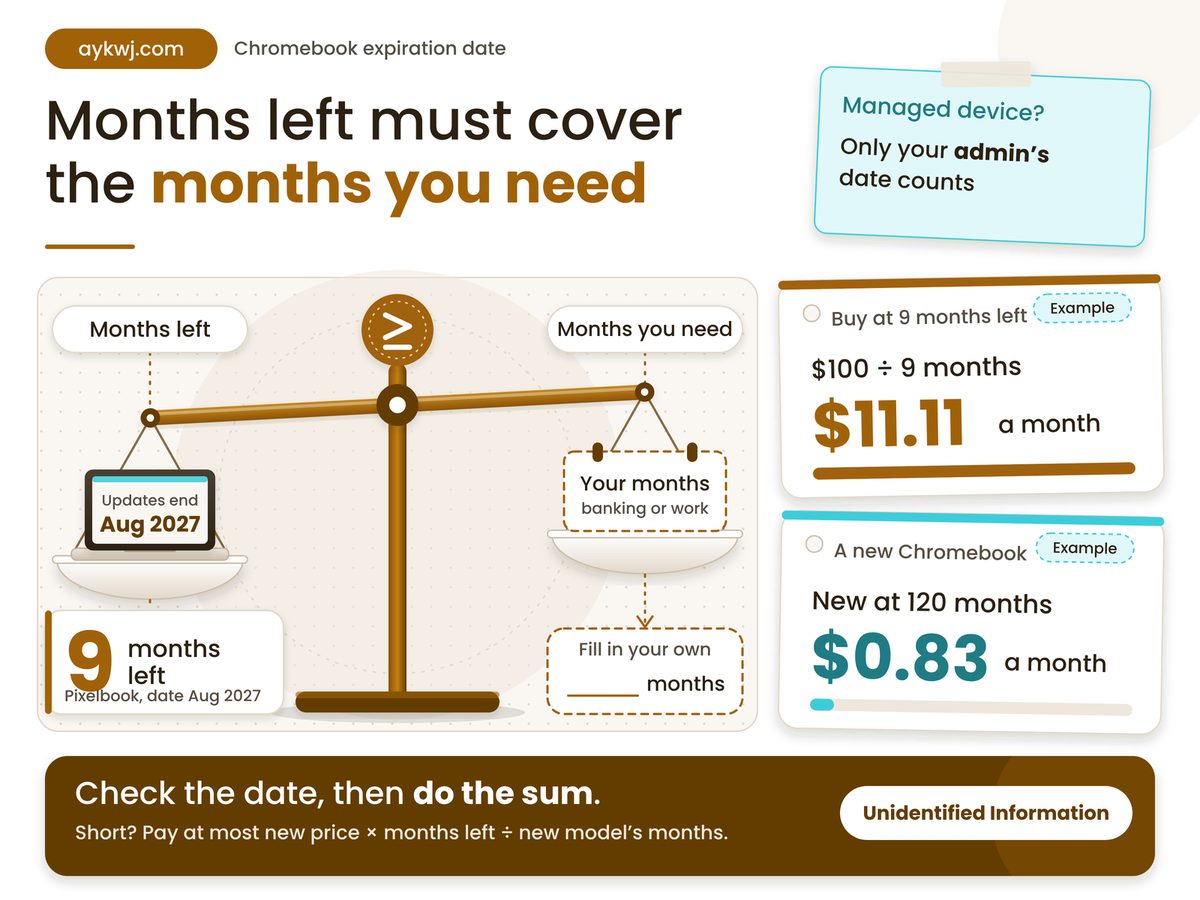
Short answer: the date ends security fixes, not the laptop, so price a Chromebook by the months it has left.
- A Pixelbook dated August 2027 has about nine months left, against a 120-month full term.
- Rule: buy or keep one only if its months left cover the months you need it for banking or work; if they fall short, pay no more than months left divided by 120 of a new model’s price.
- The date sits under Settings, About ChromeOS, Additional details, Update schedule.
- A managed school or work device needs your administrator’s answer.
What happens on your Chromebook expiration date?
On that date Google stops sending automatic software and security updates, so the laptop keeps working but receives no new fixes or features, and Google Support will not repair what later breaks.
Google’s Pixelbook help page, read on 18 November 2026, lists a Pixelbook date of August 2027 and says what goes: security updates, bug fixes and new features. It adds that “Existing features may stop working,” and that apps or extensions needing a specific OS version can lose support. Counted from today, that is under a year. A school year, or near enough.
The same page gives the Pixelbook Go August 2029, 24 months later. Our reading: a model’s name tells you nothing about its runway.
Four numbers decide whether a date matters: the runway left, its share of a full term, models already expired and the full term itself. The third comes from PIRG’s Stephanie Markowitz, quoted by The Register on 6 January 2025, so some second-hand stock may be past it. The fourth is from Google’s 14 September 2023 announcement.
Pixelbook runway
9 months
Then Google stops security fixes
Break-even share of new price
7.5%
Derived: months left over 120
Models already expired
15+
Seven brands, so check any maker
Full update term
10 years
Counted from platform release
A short runway suits a homework machine and fails anything holding your pay. Our view: the price should shrink with every month the date has already taken.
A Chromebook past its date still boots and still browses. What it stops getting is fixes, and no price tag says so.
Other makers run the same play. Windows 10 extended security updates run to 12 October 2027, and Nest thermostats show what a year past end of support looks like. Google differs: it prints the date on the device.
How do you find the date on your own Chromebook?
Select the time in the system tray, choose Settings, then About ChromeOS and Additional details; under Update schedule, the line “This device will get automatic updates until” gives your date.
- A date: that is the last day of fixes, so subtract today’s month from it.
- “Updates are managed by your administrator”: Google’s page says to ask that administrator about the auto-update policy.
- A date already past: the page says you can keep using the laptop but should consider upgrading.
Google’s help page reads “Models released before 2021 or later will get updates for 10 years,” which contradicts itself. The announcement is clearer: from 2024, devices released from 2021 onwards get the full term automatically, and older ones can be extended. Our reading: the clock starts at the platform’s release, not your purchase, so a new model on an older platform can have less than ten years.
Which situation are you buying or keeping in?
Match your situation to a row: the months left, who manages the device and the release year decide the move, and the share-of-new-price rule turns a short runway into a price ceiling.
| Your situation | Do this | Because |
|---|---|---|
| 9 months left | Pay under 7.5% of new price | Pixelbook date is Aug 2027 |
| 33 months left | Pay under 27.5% of new price | Pixelbook Go date is Aug 2029 |
| Pre-2021 model | Read the date; extension is opt-in | Automatic 10 years began with 2021 models |
| School or work | Ask your admin for the date | Policy off means updates stop at the original date |
| Date has passed | Keep it off banking and work logins | Google says security updates have ended |
Our arithmetic: 9 ÷ 120 = 7.5% and 33 ÷ 120 = 27.5%, where 120 is the full term in months. Pay more than that share and the runway costs more than new.
Plain reading: the shorter the filled bar, the less a used Chromebook should cost next to a new one. Our arithmetic: months from 18 November 2026 to each date on Google’s Pixelbook page, against the 120-month full term from Google’s 2023 announcement.
Worked example: our assumptions, none a market price, are a $100 yardstick for both machines, the Pixelbook’s 9 months left and a new model with the full 120. Cost per supported month is price divided by months left. Used: $100 ÷ 9 = $11.11. New: $100 ÷ 120 = $0.83. Break-even: the used price must be 9 ÷ 120 of the new one, so $7.50 against $100. Scale it below.
Is a Chromebook safe to use after updates end?
Usable, yes, but for banking or work logins we would not: Google says no further security updates arrive, so any flaw found later stays open on that laptop.
Managed fleets have a switch home users lack. Google’s Chrome Enterprise policy page says that with the extended-updates policy disabled or unset, devices stop updating at the original date.
Grey area, as opinion: treat an extension on an older laptop as a courtesy, not a guarantee, because Google’s footnote says some features and services may not be supported, and no page says which. Failing hardware is another fight, which our EU right to repair explainer covers.
- “Fully working” in a listing says nothing about the date: ask for the Update schedule screen.
- A new model’s date also counts from its platform’s release, so read it before you pay.
Conditions to check about your own Chromebook
- The Update schedule line shows a date, not “managed by your administrator.”
- The seller will show that screen live, not quote a spec sheet or a box year.
- You can name which logins live on it: banking, tax, work or school.
- No school or company policy that you cannot change governs the device.
This week, open Settings on each Chromebook you own, or have the seller show the Update schedule screen, and subtract today from the date. Buy or keep it if those months cover how long you will use it for banking or work logins. If they fall short, keep your cost per supported month under a new model’s: pay no more than your months left divided by its months, or replace it. The call is wrong on managed devices, where only the administrator’s date counts, and on a new model whose own date is under ten years. Check your line against Google’s Chromebook help page.
How we checked this
We read Google’s Chromebook help page, Pixelbook help page, Chrome Enterprise policy page and 14 September 2023 announcement on 18 November 2026. Derived: the worked example assumes a $100 yardstick price and the full 120-month term. No product was tested hands-on for this article. Last verified: 18 November 2026. Edited by G Ragu, reviewed after publication. Spotted something out of date? Tell us and we will correct it.
No comments
Post a Comment
Note: Only a member of this blog may post a comment.