Unzip your first Google Photos Takeout and the pictures are not the strange part. The strange part is the second file that turns up beside them. Google's help page says anything that is not part of the original photo, such as comments, is saved to a separate JSON file. Delete your library before you know that and you are trusting a copy you never opened.
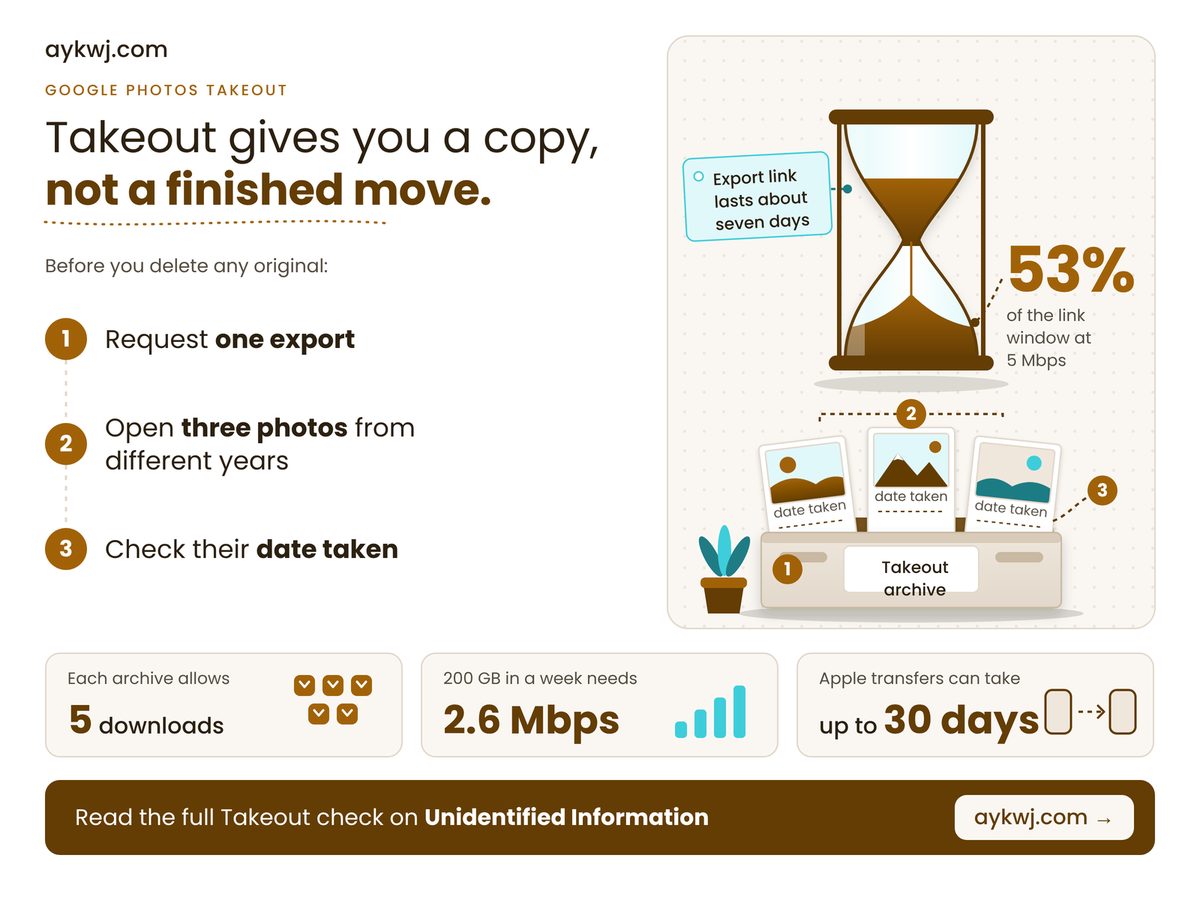
TL;DR: Takeout gives you a copy of your photos, not a finished move, so open the copy and check it before you delete any original.
- Original capture dates sit in each file's embedded metadata, not necessarily in the file date.
- Export links last about a week, so a slow line can force a second export.
- Apple's transfer skips Live Photos and original versions of edits, and will not run with Advanced Data Protection on.
Why does every Google Photos Takeout come with JSON files?
Because Takeout stores anything that is not part of the picture file itself, such as comments, in a separate JSON file, so a photo can arrive with a companion that should stay beside it. Move the pictures without it and that extra context is lost. A file readable in only one app is how formats outlive their makers, and what happens to your Microsoft Publisher .pub files shows the cost.
The original dates survive, just not in the file date. Google's Photos help page says your operating system can stamp the file with a new timestamp, while the original date stays in the embedded metadata. A tool that reads only the file date can pile years of pictures onto the afternoon you unzipped them. Sort by date taken instead.
The Apple route has the same shape. Apple's transfer page, published 29 September 2026, says shared albums, smart albums, Live Photos and some metadata are not sent, and only the latest edit of a photo goes across, not the original. Most transfers take three to seven days, and iCloud is left as it was. Advanced Data Protection, Apple's end-to-end encryption option, blocks the export while it is on, so you choose between encryption and the copy. For the wider fight over leaving a provider, see EU Data Act cloud switching costs. Cancelling storage the moment a progress bar finishes is outdated advice.
Four numbers decide whether a photo export finishes. Two are published limits, read in October 2026, and two are our arithmetic on a hypothetical 200 GB library.
Apple's Slowest Transfer
30 days
Keep iCloud until it lands
Album Cap On Google
20,000 photos
Extras copy but skip the album
Archives From 200 GB
4 archives
Derived from 50 GB archives
Slowest Line That Works
2.6 Mbps
Derived: 200 GB in one week
The slowest-line figure is the one to question. It is not a published limit: it divides the library's megabits by the seconds in a week and assumes the line never pauses. A household that streams in the evening needs headroom, and we would plan on double.
Google's help pages do not say how edited or motion photos are exported. Until they do, open a few of yours before deleting anything.
What should you check before you delete anything?
Four situations change what you should do, namely big libraries, accented file names, Apple's Advanced Data Protection and slow connections, and the table below gives each one action plus a default for everyone else. Find the row that sounds like you and read across.
| If you | Do this | Because |
|---|---|---|
| 📊 Big library | Set archive size to 50 GB | Fewer archives to track and re-download |
| 🛠 Accented names | Choose zip, not tgz | Tgz names cannot hold Unicode |
| 🔒 Apple ADP on | Weigh encryption against the copy | Apple blocks the export while it is on |
| ⏱ Slow line | Multiply your GB by 0.0132 | Gives the minimum Mbps for one pass |
| 🧾 Anyone else | Open 3 photos; check date taken | Gaps show while the source exists |
Read down the middle column and one pattern shows: every action is cheap now and impossible later, once the source is gone.
Can your line finish a 200 GB download before the link lapses? At 5 Mbps it uses about half the week, and at 2 Mbps it cannot finish. The bars are our arithmetic, 200 GB × 8 ÷ speed against 168 hours, and assume a flat-out connection, so read them as best cases.
Worked example: take a hypothetical 200 GB library and 50 GB archives, so 200 ÷ 50 = 4 archives. The download is 200 × 8 = 1,600 gigabits, or 1,600,000 megabits. A week is 7 × 24 × 3,600 = 604,800 seconds, so on these assumptions the line must average 1,600,000 ÷ 604,800 = 2.6 Mbps. Multiply your own gigabytes by 0.0132 for your number, then compare it with a speed test taken on a busy evening.
How long does a Google Photos export link last?
Google's account help page says each export archive expires in about seven days and allows five downloads, after which you must request another, so a stalled download can force a fresh export. These are the limits as of October 2026.
The same page offers zip or tgz. Zip opens on almost any computer, while tgz may need extra software on Windows and cannot carry Unicode characters in file names. We would take zip every time.
A phone that might be reset in a repair is the same problem on a deadline: what the EU right to repair owes you covers the rights, and the export covers your photos. Four traps remain.
- Names: Apple says transferred albums and videos arrive with names starting 'Copy of', so they sort under C.
- Late changes: Google says photos added or deleted after you request an export may not appear, so request again if you kept shooting.
- Rolling backups: Google can schedule an export every two months for a year, but only with Google Photos selected alone, and not under its Advanced Protection Program.
- Motion and edits: neither company explains how every Live Photo or edited copy is handled, so test one of each.
Check these against your own library
- Free space on your drive is smaller than your library, so the archives cannot all land.
- Your photo viewer sorts by modified date, so your timeline will collapse onto the download day.
- You rely on shared albums or comments, which Apple does not send and Google keeps in JSON.
The decision is whether to delete the originals, and the answer is not yet. This week, request one export, download every archive the day it is ready, then open three photos from different years and read the date taken. Delete only when those dates match, the archive count adds up and, on the Apple route, the transfer has finished.
How we checked this
We read three vendor pages: Apple's Transfer a copy of your iCloud Photos (published 29 September 2026), Google's How to download your Google data and the Photos version of that help page (both undated, read 24 October 2026). The worked example assumes a 200 GB library, 50 GB archives and a connection running flat out. No product was tested hands-on for this article. Last verified: 24 October 2026. Edited by G Ragu, reviewed after publication. Spotted something out of date? Tell us and we will correct it.
No comments
Post a Comment
Note: Only a member of this blog may post a comment.